 LIGHTREADR
Read and listen at the same time
Every word lights up as it’s spoken. Your eyes and ears stay on the same line.
The short version: LightReadr is a free iPhone app that reads your ebooks aloud and highlights the text in step with the voice, so you can follow along on the page. No need to buy the audiobook as well.
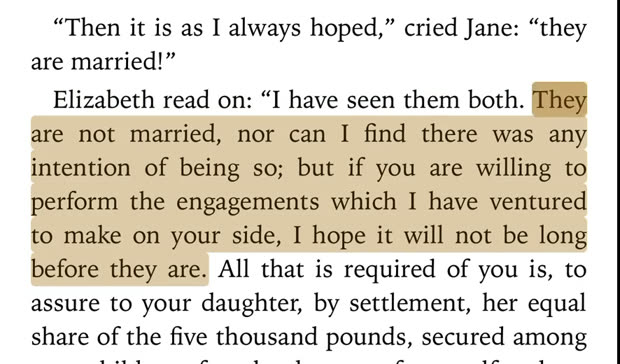
How it works
- The sentence being read is highlighted, and the word being spoken is picked out within it.
- Tap any sentence and narration jumps there. No scrubbing back and forth.
- Switch any time. Read silently for a while, then tap Read Aloud and it starts from where you are.
- Keep going with the screen off. Lock your phone and it keeps reading. Your place is waiting when you look back.
Watch a 16-second recording from an iPhone 17 Pro to see it in action.
Like Immersion Reading, without buying the book twice
Amazon’s Immersion Reading pairs a Kindle book with its Audible narration, which usually means buying both, and only works for titles that have a matching audiobook. LightReadr generates the voice itself, on your phone, so any compatible ebook becomes a read-along book. That includes the hundreds of thousands of free classics on sites like Project Gutenberg.
Why read and listen together?
People use it for different reasons:
- Staying focused. Some people find it easier to stay with a page when they can hear it too.
- Long, winding sentences. Hearing the rhythm of older prose can make a dense page easier to follow.
- Moving between page and headphones. Read on the couch, listen on the walk, and never lose your place.
- Setting the pace. Slow narration down to 0.5× to take it in, or speed it up to 2×.
A voice you can listen to for hours
Most read-aloud features use your phone’s built-in system voice. LightReadr uses a neural voice model that runs entirely on your iPhone, with natural pacing and intonation, and several voices to choose from. Your books are never uploaded anywhere.
What you can read
- Included: five classics come preloaded, so you can try it right away.
- Free to download: public-domain books from Project Gutenberg, Standard Ebooks, and the Internet Archive. Here’s how to get them onto your iPhone.
- Not supported: books bought in the Kindle or Apple Books stores (they’re locked to those apps), and PDFs for now.